


CAPTURE
On-device capture
Inspect requests and responses in real time
Virtual-interface capture · Packet Tunnel
On-device HTTP packet capture & HTTPS sniffer for iOS
A virtual interface takes over device traffic · no jailbreak · no Wi-Fi proxy setup

Capture HTTP/HTTPS on your iPhone. TLS plaintext needs a CA you trust; traffic stays on the phone by default.
NetPeek is an on-device iPhone HTTP/HTTPS packet capture and network debugger. Capture, rewrite, and replay run on the phone—no jailbreak. TLS plaintext needs you to install and trust a local CA and add hosts to the MITM list. Request data isn’t uploaded by NetPeek by default. Exports, or MCP after you enable it for an AI client you authorize, are how captures leave the phone. Crash reports and anonymous statistics stay off until you enable them under Analytics & Improvements.
Optionally enable MCP so an AI client you authorize on this device or the same LAN can analyze captures. Comparing with a desktop proxy? See vs Charles.
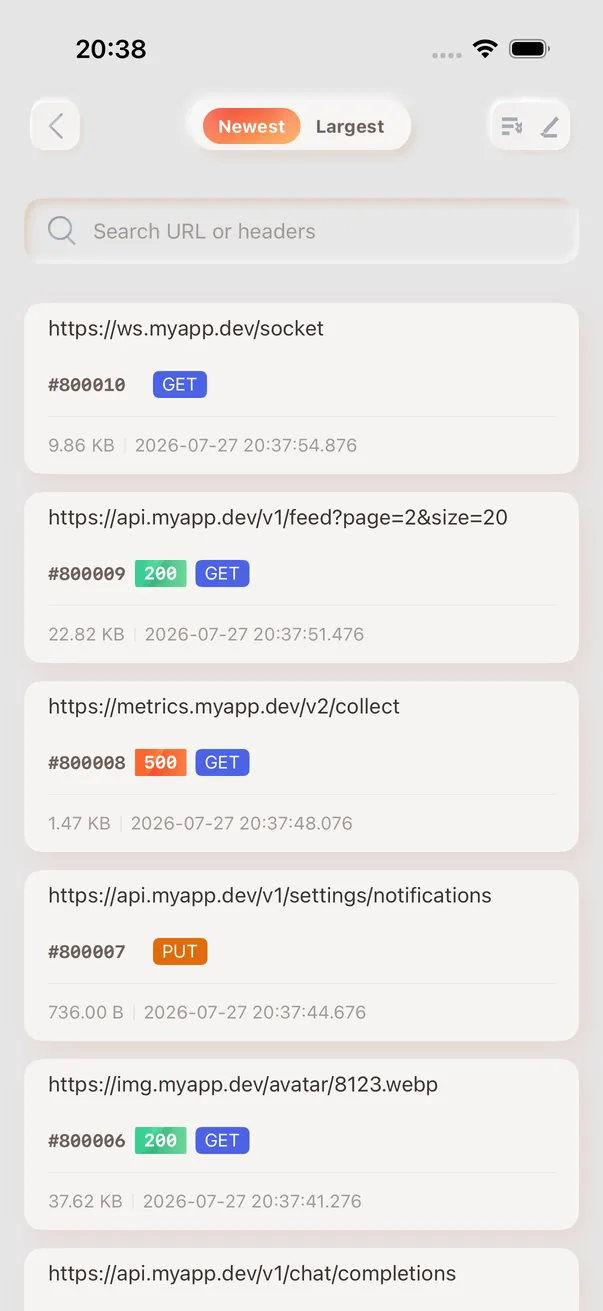
Live capture
Streaming rows with method, host, status and timing. Tap any row to open the full detail — connection, TLS, request and response headers, and a status timeline.
Capabilities
Inspect requests and responses in real time
Read TLS plaintext after explicit CA trust
Edit headers and bodies or return a mock
Handle advanced debugging logic in JavaScript
Edit and resend captured requests
Optional MCP for a local or same-LAN AI client you authorize
Narrow traffic by host and path
Capture, inspection, and rules run on device
FAQ
No. NetPeek records HTTP/HTTPS traffic through the standard iOS on-device tunnel API—no jailbreak required.
No. Capture, HTTPS inspection, rewriting, scripts, and replay all run on the iPhone itself.
Download the locally generated CA profile in the app, install it under Settings → General → VPN & Device Management, manually enable full trust under Certificate Trust Settings, then add the target host to the MITM list and send a new request.
Capture bodies are not uploaded. Capture, storage, and inspection stay on the device. An export, or MCP after you enable it and hand over the token, is how a capture reaches someone else.
You can filter the request list by host and path inside the app to focus on the API under debug—this is not an OS-level “capture only one app” mode.
Yes. A request can be copied as a cURL command, exported as a HAR file, or turned into a replay you can edit and resend.